
· Matthias Berger
A Ready-Made R Environment for Movement Ecology
"It works on my machine. Which versions do you have?"
Getting a stable R setup for animal tracking data is harder than it should be. move2 and move need sf and terra, which need GDAL, PROJ, GEOS and UDUNITS on the system, in versions that fit each other. moveVis is no longer on CRAN (it was archived in July 2023) and has to come from GitHub, with ffmpeg and a GIF encoder behind it. I have lost more than one afternoon to this, and every update can start it again.
So we packed a working setup into a container: movebank-rocker.
One command
You need Docker. Then:
docker run -p 8787:8787 -e PASSWORD=movebank mcb77/movebank-rocker:v0.2.0
Open http://localhost:8787 in your browser and log in as rstudio with the password movebank. You get RStudio with everything installed. The first download is large (about 2.4 GB, 7 GB once unpacked, most of it the geospatial base and moveVis's video tools); after that it starts in seconds.
What's inside
It is built on rocker/geospatial, the R community's standard image for spatial work, plus the Movebank packages:
| Package | Version |
|---|---|
| R | 4.4.2 |
move2 | 0.4.4 |
move | 4.2.6 |
moveVis | 1.0.1 |
sf | 1.0-19 |
terra | 1.8-29 |
ggplot2 | 3.5.1 |
plus rnaturalearth for base maps, and dplyr and the rest of the tidyverse.
Every version is pinned: the base image by its digest, CRAN packages by a dated snapshot of the Posit Package Manager, moveVis by a fixed commit. The build fails if a version differs from the list. The same tag gives you the same 313 packages, today and in three years. Packages you install yourself inside the container come from the same snapshot, so they fit the rest.
From Movebank to an animation
With a Movebank account, move2 downloads a study directly. move2 usually keeps your password in the system keyring, which a container doesn't have, so pass a handle instead; RStudio asks for the password and stores nothing:
library(move2); library(moveVis); library(sf)

h <- movebank_handle("your-movebank-username")
albatrosses <- movebank_download_study(2911040, sensor_type_id = "gps", handle = h)
Study 2911040 is the Galapagos albatross study we used throughout our Movebank series, published under CC0. Pick six birds and a month, and let moveVis turn them into an animation:
albatrosses <- albatrosses[!st_is_empty(albatrosses), ]
birds <- c("2911150", "2911168", "2911178", "9472208", "9472218", "9472220")
six <- filter_track_data(albatrosses, .track_id = bit64::as.integer64(birds))
t <- mt_time(six)
six <- six[t >= as.POSIXct("2008-07-11", tz = "UTC") & t < as.POSIXct("2008-08-09", tz = "UTC"), ]

m <- align_move(mt_filter_unique(six), res = units::set_units(3, "h"))
frames <- frames_spatial(m, map_service = "esri", map_type = "world_ocean_base",
                         path_legend = FALSE, trace_show = TRUE, tail_length = 16) |>
  add_labels(x = "Longitude", y = "Latitude") |>
  add_timestamps(type = "label") |>
  add_progress()
animate_frames(frames, out_file = "albatrosses.gif", fps = 15, width = 800, height = 600)
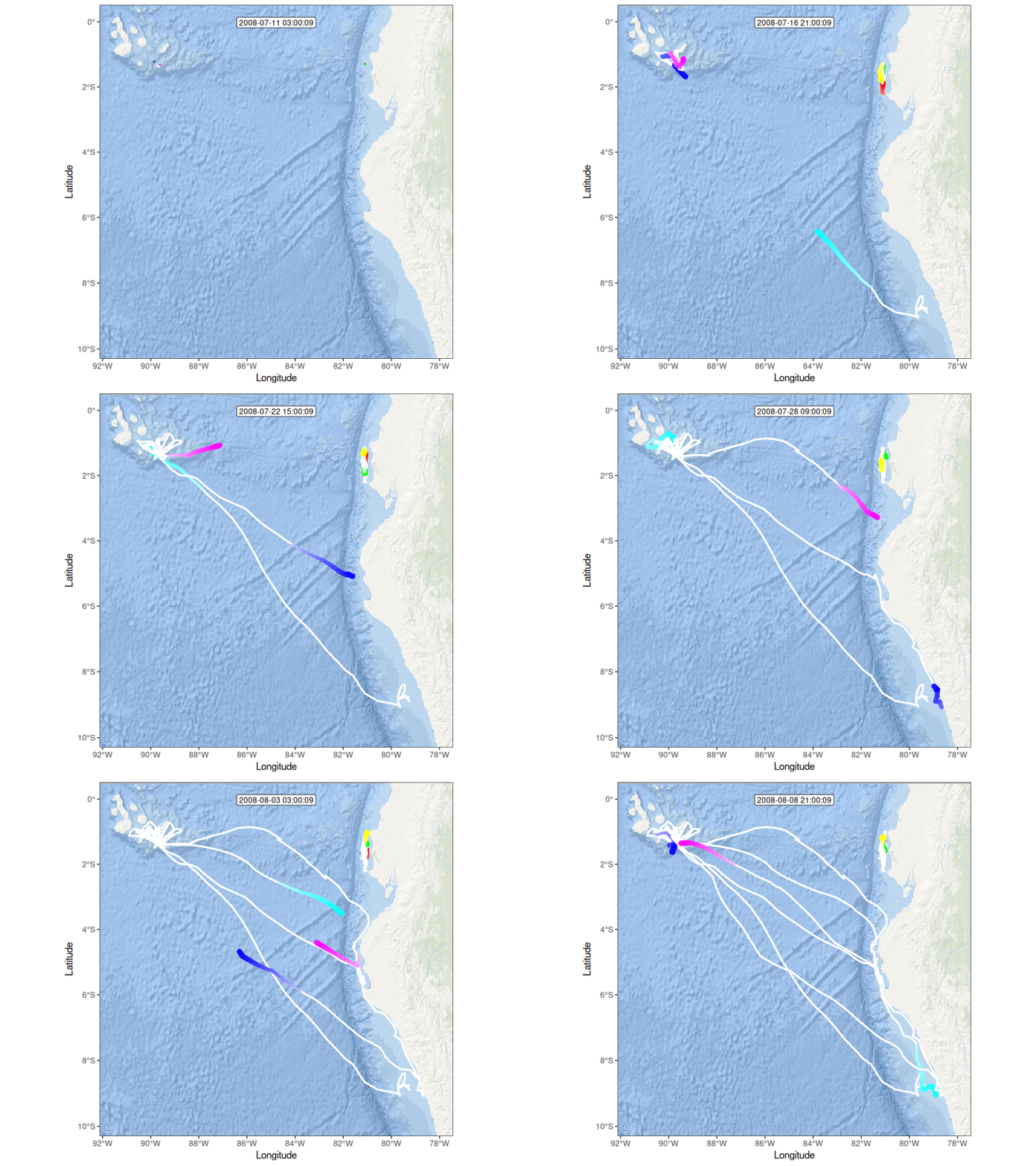
Six waved albatrosses, 11 July to 8 August 2008, in three-hour steps (study 2911040, CC0). The white lines are the whole route. Basemap: Esri World Ocean Base. Rendered in movebank-rocker in about three minutes.
One trap we ran into: moveVis's default map service, Carto, now asks for an API key and draws "API key required" across your map without one. Esri's maps work without a key.
Where it helps most
- Courses and workshops. Every participant runs the same command and has the same environment. The first hour goes to movement data, not to installing GDAL on twenty laptops.
- Reproducible papers. Name the image tag in your methods (
mcb77/movebank-rocker:v0.2.0). Anyone can rerun your analysis with exactly your versions, years later. - Colleagues on other systems. Linux, macOS and Windows get the same environment. (On Apple Silicon Macs, add
--platform linux/amd64; it runs emulated, which is fine for interactive work but slower.) - Trying something new without touching your own R installation.
Your files stay on your computer: add -v ~/my-project:/home/rstudio/my-project to the command and the folder appears in RStudio.
Honest limits
- It is a snapshot. R 4.4.2 and the packages above, not the newest releases. We plan to update it about twice a year, each update under a new tag; old tags stay available.
- It's big. About 7 GB on disk.
- x86-64 only for now, hence the emulation on Apple Silicon.
And without internet?
The image also works with a local copy of your Movebank studies. Set one variable and move2 reads from your own computer instead of movebank.org. That is the subject of Analyse Movebank Data in R Without Internet.
What's Next?
The recipe is open source (MIT) on GitHub, the image is on Docker Hub. If a package you need is missing, or you use it in a course, we'd like to hear about it.
Animations like the one above, at full scale and for your own data, are something we do as a service: see Data visualization and animation. Questions? Get in touch.
About the Author
Matthias Berger has been a key member of the Movebank Development Team since its inception in 2008, contributing to the advancement of animal tracking databases and supporting researchers worldwide.